
Commission macros
Dwarven and Glacite tasks, Mithril priority, Mining Speed Boost and Royal Pigeon support.
Hypixel SkyBlock mining client
A free, client-side mod for Hypixel SkyBlock. Run Dwarven and Glacite commissions, follow rendered gemstone routes, and keep mining progress in one movable Activity HUD.
Dwarven and Glacite tasks, Mithril priority, Mining Speed Boost and Royal Pigeon support.
Gemstone, Glacite and ore routes with numbered waypoints and landing-block guides.
Twelve gemstones, ten ore types and seven Glacite Tunnel targets to choose between.
Commission, powder and Skill XP rows inside a movable, resizable Activity HUD.
JasperClient’s modules are built around recognizable SkyBlock mechanics: the commission board, Mithril and Titanium, gemstone veins, Etherwarp routes, Suspicious Scrap and Cold in the Glacite Tunnels.
COMMISSION INPUTS
Event handoff: Auto Gourmand handles Mithril Gourmand, then returns to the commission run.
Dwarven Commission Macro reads the active task and uses your selected movement mode. Mithril Priority chooses between gray, green and blue Mithril instead of treating every vein the same.
TARGET FILTER / 12 GEMSTONES
Gemstone Macro targets the gemstones you select and renders the active route with index numbers. Line To Waypoint points toward the next stop, while Etherwarp ESP marks the checked landing block.
TUNNEL TARGETS / SELECT ANY COMBINATION
Tunnel Miner follows the active Glacite route and mines selected targets within its radius. Glacite Commission Macro handles commissions with ability timing; Auto Fossil Excavator covers the Chisel and Suspicious Scrap minigame.
Search by module, resource or mechanic. Filter the same directory by mining, route tools, session controls or HUD features. Every entry explains what the module actually does.
Runs Glacite Tunnels commissions with Mining Speed Boost and rod-swap ability timing.
Reads Dwarven Mines commissions, travels by walking or Etherwarp, and supports crouch mining, Royal Pigeon hand-in and Titanium movement.
Takes over Mithril Gourmand during Dwarven commissions, reserves slots for Tasty Mithril and feeds Don Expresso at your chosen time.
Chooses whether commission macros prioritize gray, green or blue Mithril.
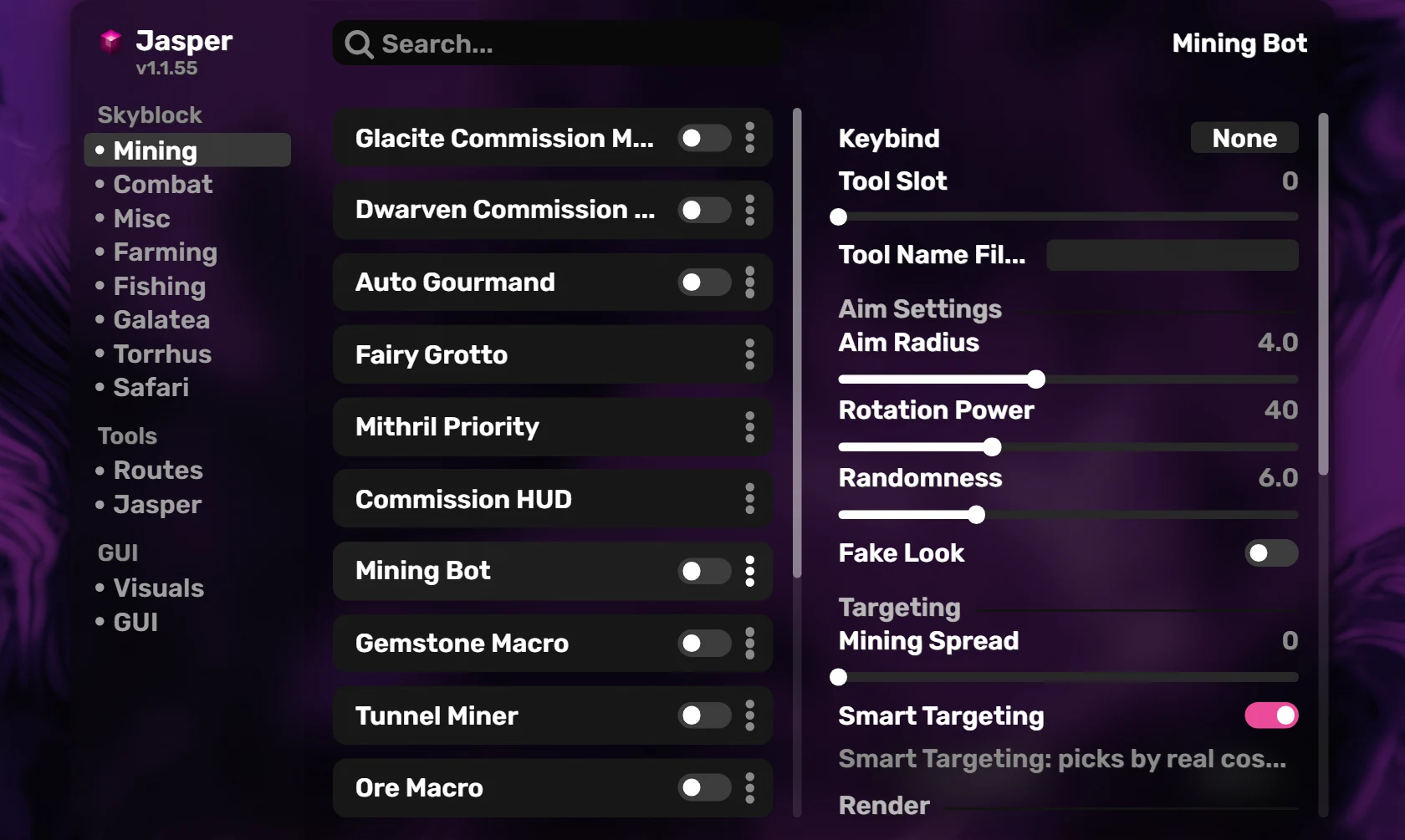
Targets nearby blocks with tool filters, configurable aim and Smart Targeting that weighs rotation cost and break time.
Mines any of twelve selected gemstone types along a rendered route, with Mining Speed Boost and optional ranged enemy clearing.
Follows an active Glacite route and mines seven selectable resources within its radius, with an optional Cold threshold for lobby swapping.
Runs separate Ore Transport and Ore Mine routes while targeting ten ore types, including Mithril and Titanium.
Operates the Glacite Tunnels fossil excavator using a Chisel and Suspicious Scrap.
Mines for powder in a selected Crystal Hollows region, with an automated loop, optional Etherwarp entry and ranged enemy clearing.
Opens powder chests with right-click or puzzle-rotation behavior, adjusted to your Great Explorer level.
Breaks nearby stone and ore, sand, end stone, gravel or custom blocks with range, rate and target-highlight controls.
Scans for Fairy Grottos and can show tracers and labels, with Mansion and Palace route setup.
Selects and renders movement, Etherwarp, gemstone, shard, Glacite, ore transport or ore mine routes.
Reads jump height and speed as you move, then walks and sprint-jumps suitable route segments.
Handles route-based Etherwarp travel, with Fast Hops chaining one hop per tick.
Sets rotation power and randomness for supported mining macros.
Draws a configurable guide line from your position to the next route waypoint.
Marks the checked Etherwarp landing block with configurable fill, outline and color.
Replaces the vanilla block outline with configurable fill, outline and mining-progress display.
Stops a run after the commission count or time limit you choose.
Schedules breaks at your chosen interval and duration, with optional interval randomization.
Saves, switches and shares complete setups without passwords, keys or webhooks; loading a profile never starts a macro.
Sells a full inventory on the Bazaar during a macro, with optional scheduled sack sales.
Can stop every macro when the game closes so it does not remain active on the next launch.
Provides automatic sprinting and automatic sneaking at ledges.
Shows the running macro and its enabled information rows in one movable, resizable HUD card.
Adds live commission progress to the Activity HUD.
Adds powder gains to the Activity HUD, with a configurable powder bonus.
Shows coordinates, facing, zone, clock, FPS and ping in a configurable Activity HUD dashboard.
Adds Skill XP progress to the Activity HUD.
Adds optional FPS, TPS and ping performance rows to the Activity HUD.
Changes the menu and Activity HUD appearance with named presets, including Jasper, Ghost, Obsidian, Frost and Terminal.
Provides Full Bright for dark mining areas, with a configurable toggle key.
Try a resource such as Mithril, a mechanic such as Etherwarp, or clear the search and category filters.
Module availability and behavior depend on your route, selected targets, equipment and in-game activity. This directory describes features; it does not provide in-game controls.
The primary free download for Minecraft Java Edition 26.3. Install the client-side mod in a matching Fabric instance and press J in game.
/get/jasperclient-26.3.jarFabric 26.2 is available as a quiet alternate for Minecraft 26.2 instances.
JasperClient is a mod JAR, not a separate launcher. Match the game, loader and JAR versions before launching.
Primary requirements: Minecraft Java Edition 26.3, Fabric Loader for 26.3 and Java 25 or newer.
Create or open a Minecraft Java Edition 26.3 instance with Fabric Loader and Java 25 or newer.
Download jasperclient-26.3.jar from the primary download block on this page.
Put the JAR in that instance's mods folder. Keep the 26.3 build paired with Minecraft 26.3.
Launch the instance, join Hypixel SkyBlock, and press J to open the JasperClient menu.
Version matching, menu access, routes and the limits of automation claims—answered directly.
JasperClient 26.3 is a free, client-side Fabric mod for Minecraft Java Edition 26.3. It focuses on Hypixel SkyBlock mining with commission macros, mining routes, powder tools, session controls and HUDs.
Yes. Both the Fabric 26.3 and Fabric 26.2 downloads are free. This website does not require an account, license key or checkout.
Choose Fabric 26.3 for Minecraft Java Edition 26.3. Use the smaller Fabric 26.2 download only with a Minecraft 26.2 instance. Keep each JAR paired with its matching game version.
Launch your matching Fabric instance, join Hypixel SkyBlock and press J. If you changed the Open GUI binding, use the key shown in Minecraft Controls instead.
No. Mining Bot can select blocks around you. Gemstone Macro, Tunnel Miner and Ore Macro use an active route, so select and configure the appropriate route before starting those modules.
The Activity HUD follows the running macro and can include commission progress, powder gains, Skill XP, coordinates and performance rows such as FPS, TPS and ping. Open chat to drag HUDs, and scroll over one to resize it.
No. Automation may violate server rules and carries risk. JasperClient is independent of Hypixel, Mojang and Microsoft. Review the rules that apply to you and use the mod at your own risk.